| Type Of Error | What It Looks Like | Explanation | What To Do |
|
DNS |
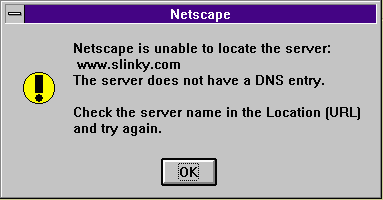
"Netscape is unable to locate the server: www.whatever.com
The server does not have a DNS Entry. Check the server name in the Location (URL) and try again."
|
A DNS Error is caused when your navigator fails to contact a DNS server
or fails to get a DNS entry. DNS, or the Domain Name System, is what
keeps track of all the Names of places on the Internet. If you see a DNS Error,
it may be the result of one of the following:
|
If other servers can be contacted, the site probably does not exist.
Re-type or ask for clarification of the URL.
If all sites give you this message, your DNS server(s) cannot be contacted. If this is the case, make sure that your connection is active. Then make sure that your DNS configuration. If the above checks out, you may need to contact your ISP for more information. |
|
HOST |
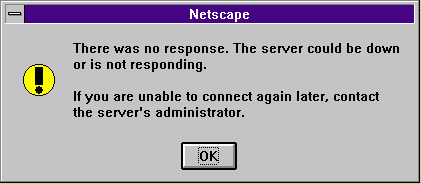
"There was no response. The server sould be down or
is not responding.
If you are unable to connect again later, contact the server's administrator."
|
A Host Error indicates that the site exists, but when Netscape tried
to contact the site, it could not be reached. When you see the Host Error,
any of the following could be true:
|
If all sites give you this error, you may need to contact your
ISP for more information.
If you can connect to other sites, the best advice is to try the bad Site later. If the problem continues, contact that Site's Administrator, if available, for more help. |
|
NO DATA |
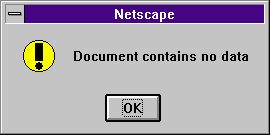
"Document contains no data."
|
Netscape has located the file that you have requested. It exists, but is blank (of zero length). | Get another file. |
| NETWORK |  , , (Stop Light Still Lit, Netscape Icon Still Moving after several minutes) |
The Network is down between you and the Site. If it hasn't connected after a few minutes it probably won't. | Feel free to press the Stop button on Netscape. Then you can try the site again immediately or later on.. Most Network outages are short in nature. |
| TCP | 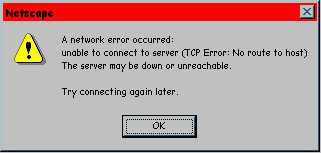 (Or Something Similar) |
There is an error with your network connection on your computer. | Ensure that your dial-up software connected correctly and if not then attempt a redial. |
| SERVER | "403 Forbidden"
"404 Not Found" "500 Server Error" |
These are not errors handled by Netscape, but errors on the Site that
you are trying to reach. There are many error codes which vary from site
to site, and many are self explanatory. The most common are noted here:
|
404: Check for typo's (remember some web servers are case-sensitive),
or choose another page.
403/500/501: Choose another page or contact the Site's administrator or webmaster for further information. |